What is an audit trail in accounting software?
An audit trail is a record of the changes made to accounting data: what changed, when, and who made the change.
In Genoa Gov, every amendment to a posted voucher is kept in a full audit trail.
Genoa Gov allows vouchers to be amended after they have been posted, and keeps every amendment in a full audit trail. The accounts section of a government department can therefore correct a posted voucher without losing the record of the correction. The audit trail remains a reference for internal review and for audits of the accounts.
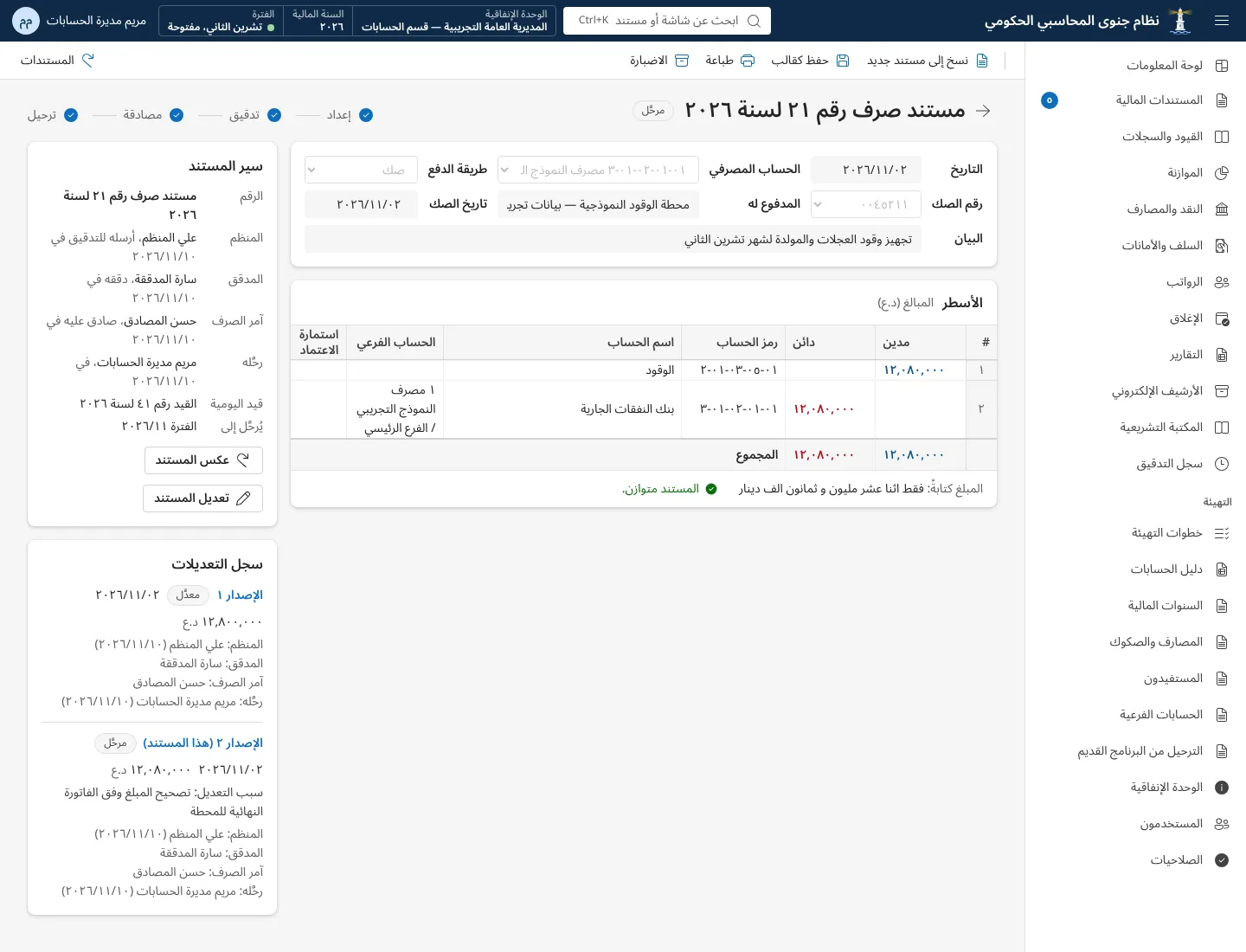
Mistakes happen in any accounting work. After a voucher has been posted, it may turn out that the amount, the account or the description is wrong, whether during reconciliation, during an audit or while preparing statements.
Genoa Gov allows the posted voucher itself to be amended, with the amendment kept in a full audit trail, so the voucher ends up correct and its history stays visible.
Genoa Gov keeps every amendment to a posted voucher in a full audit trail. The purpose of the audit trail is to show who made the amendment, when it was made, and what changed in the voucher.
You can see the audit trail and how it is displayed during a demo of Genoa Gov.
The accounts of government departments are subject to internal audit and to oversight by the Federal Board of Supreme Audit, and auditors often ask why a figure or a voucher has changed.
With a full audit trail, every change to a posted voucher has a record that can be referred back to, rather than a new figure replacing the old one with nothing left to show for it.
An audit trail is a record of the changes made to accounting data: what changed, when, and who made the change.
In Genoa Gov, every amendment to a posted voucher is kept in a full audit trail.
Not necessarily: Genoa Gov supports amending a posted voucher, and keeps the amendment in a full audit trail.
Whether a particular correction should be made by amendment or by a separate journal voucher is a decision for the accounts section and the instructions it follows.
Payment, receipt and journal vouchers audited and approved by more than one user.
Close each month and close the fiscal year as two clear steps in the system.
Every office works in its own separate database.
Book a demo and we will walk you through the screens that matter to you, or send us your question on WhatsApp.